
Loading Data
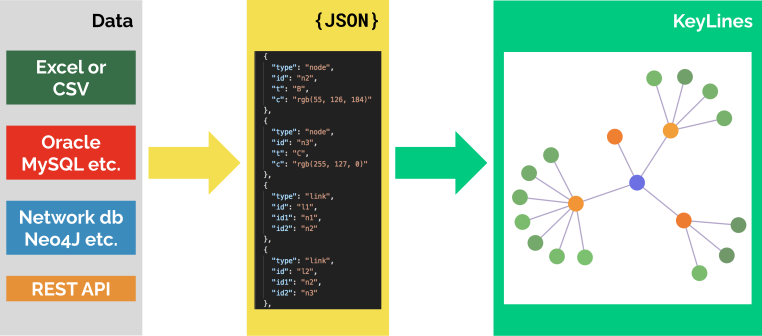
KeyLines only accepts data in JSON format:
const dataObject = {
  type: 'LinkChart',
  items: [
    { id: 'node1', type: 'node', t: 'node label 1', c: 'blue' },
    { id: 'node2', type: 'node', t: 'node label 2', c: 'blue' },
    { id: 'link1', type: 'link', id1: 'node1', id2: 'node2', t: 'link label', c: 'rgb(0, 0, 255)' },
    { id: 'annotation1', type: 'annotation', subject: 'link1', t: { t: 'annotation label' } }
    ...
  ]};
Due to the variety of data types, there is no tool for automatic data conversion in KeyLines. You can convert and parse your data either server-side or client-side.
KeyLines is generally tolerant of bad data where possible. Invalid values for properties are usually treated as undefined and the remaining valid data is used to build the graph.
Database compatibility
KeyLines is database agnostic. It works with data passed to it from any source: Graph database, NoSQL datastores, triple stores, SQL databases or a static csv or json file. Graph databases, which are NoSQL datastores optimised for connected data, are particularly suitable for KeyLines deployment.
As long as the data is connected and can be parsed into our published JSON format, KeyLines can visualise it inside the web browser.
For examples of integrating with databases, see our Database Demos and our Neo4j Tutorial.
Loading data into a chart
Once your data is in the KeyLines JSON format, call either chart.load(), chart.merge() or chart.expand() and pass the data object as the first argument:
chart.load(dataObject);Make sure that you've created a chart with KeyLines.create() before calling any of these functions.
- chart.load() loads the specified data and deletes any other data from the chart. This is useful when loading data initially when a user first imports data.
- chart.merge() adds new items to the chart or modifies the properties of existing items. If the merged data contains any items with already existing ids, the properties of existing items will be replaced with the new properties.
- chart.expand() runs a merge followed by a layout. You can specify the layout in the chart.expand() options.
It's usually a good idea to run a layout after you've loaded or expanded your data. See our Layout Basics for more details.